Key summary:
This article outlines the essential orchestration patterns used in production to manage how agents plan, act, and verify work under real-world constraints.
Core orchestration patterns: A deep dive into five primary frameworks.
Product impact analysis: Detailed comparisons of how different agent architectures affect critical performance metrics.
Strategic selection guide: Practical advice for matching orchestration patterns to task complexity and risk profiles.
As AI systems move from single prompts to autonomous agents, the real challenge shifts from model quality to coordination.
An AI PM no longer ships “an AI feature”. They design systems where multi-agent systems plan, act, verify, and hand work off to each other under real-world constraints. That’s where orchestration patterns come in.
These patterns determine how reliably AI agents complete tasks, how safely they operate, how fast they respond, and how expensive they are to run. Understanding them is quickly becoming a core product skill, not an implementation detail.
Integrate AI into Products and Processes
Get insights on AI product implementation from the CPO at Financial Times, Debbie McMahon
GET THE PLAYBOOK
The Core Orchestrator Patterns Used to Manage AI Agents
Modern AI products rarely rely on a single agent acting in isolation. In production systems, AI agents you build are coordinated through well-defined orchestration patterns such as planner: executor loops, hierarchical task decomposition, tool-routing, guardrails and verification loops, and agent handoff protocols.
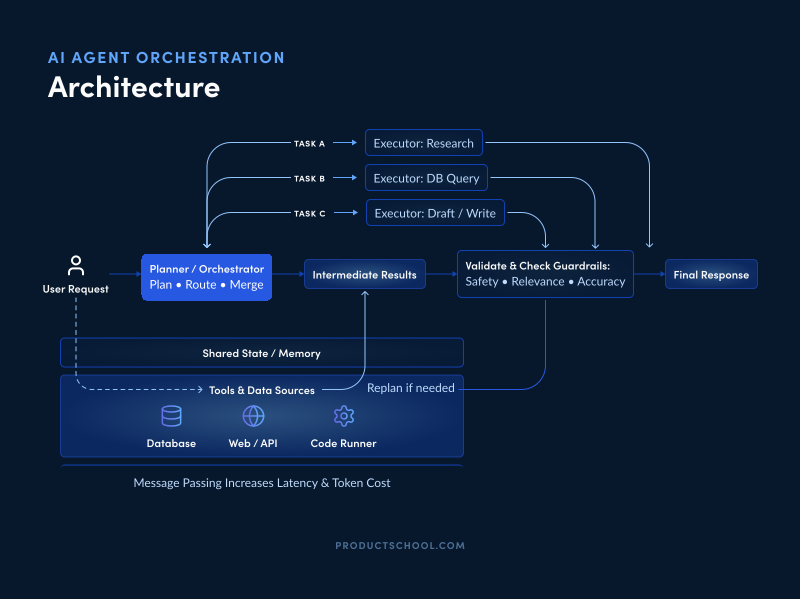
These patterns shape how agents reason, act, collaborate, and recover when things go wrong.
Each pattern solves a different class of product problems. Some help agents plan complex work. Others control risk, manage latency, or keep costs predictable at scale.
Below, we will break down each of these orchestration patterns, explain what they are designed to solve, and explore how they affect product performance, safety, latency, and cost. Let’s dive into it:
1. Planner–executor loops
A planner–executor loop splits reasoning and action into two roles. The planner agent decides what to do (the high-level plan) while one or more executor agents carry out each step and report back.
This pattern is common in frameworks like LangChain and ReAct, where an LLM generates an action plan and then invokes tools or sub-agents to execute each step. We explain this nuanced difference between LLMs and AI regents in this piece.
Planner–executor loops solve complex tasks by breaking them into manageable sub-steps and reconciling results.
For example, an agent might plan to “research topic → write draft → summarize,” then call different specialized executors for each subtask. In a customer support bot, the planner could identify that the user needs billing information and troubleshooting, and then use executor agents to query the database and draft a helpful response.
Performance: Planner–executor can improve throughput on complex tasks by parallelizing subtasks, but each step adds overhead. Message passing between agents “increases latency and token cost”. Effective caching or asynchronous execution can mitigate slowdowns.
Safety: The planner can vet and control outputs from executors, reducing unsafe or irrelevant actions. However, errors can propagate if the planner’s instructions are wrong. Adding validation at each step (see guardrails below) helps.
Latency: This pattern often incurs higher latency, since one agent waits for others to finish. Each “plan → act → review” cycle adds extra calls. In time-sensitive tasks, balance depth of planning with responsiveness.
Cost: Multiple LLM calls (for planning and execution) and tool use raise compute costs. Using smaller models for executors or skipping planning when not needed can save budget.
Scalability: It scales well across tasks. New executors (specialists) can be added without retraining the planner. The planner’s prompt may grow complex, so keep plans concise.
In practice, planner–executor loops power many AI coding assistants and chatbots. For instance, a code-generation agent might first plan a sequence of functions, then execute each by generating code and running tests.
Companies building customer-support agents have planners to route requests and executors to fetch data or draft replies. Using a planner/executor loop (e.g. LangChain Agents or ReAct) is a core way to select and run tools programmatically.
2. Hierarchical task decomposition
Hierarchical task decomposition creates a multi-level “command chain” of AI agents.
A top-level manager agent sets goals and delegates to subordinate agents, which may themselves be managers for lower-level agents. This is pretty similar to a company product team structure: “supervisory/manager agents setting goals and subordinate agents executing specialized tasks. Information flows up and down for coordination purposes.
This pattern shines for broad, open-ended problems that need extensive planning. It solves ambiguity by structuring tasks into layers (for example, splitting a project into phases, then features, then functions). Each agent focuses on its niche, thus reducing complexity.
Performance: A hierarchical system can improve performance by parallelizing at each level: high-level product goals are split into independent subgoals that can run concurrently. But coordination overhead can slow things down if not well-managed. Large hierarchies may require more agents, but each does narrower work efficiently.
Safety: Each layer provides oversight. A supervisor agent can catch mistakes from sub-agents before they become problems. However, miscommunication between layers could still cause errors if context isn’t properly shared. Structured prompts and shared memory help maintain consistency.
Latency: Parallelizable subtasks can reduce total completion time (for instance, different feature teams working simultaneously). Yet each handoff between hierarchy levels adds steps, so the critical path might be longer than a flat approach. Hierarchy works best when large chunks can indeed be done in parallel.
Cost: Many agents (possibly each a model instance) means higher compute usage. On the other hand, each agent can be smaller or more specialized (and therefore cheaper) than a monolithic model. Weigh model size versus number of calls.
Complexity: Architecting a hierarchy adds design complexity. Prompts must include enough context for each agent’s level. But this pattern aligns well with complex domains like software design or multi-step workflows, making maintenance easier by the separation of concerns.
AI use cases are best in multifaceted products: e.g., workflow automation (an agent chains together CRM, scheduling, and email sub-agents), or coding agents designing a system architecture.
For example, a large software development task can be hierarchically decomposed into frontend vs backend, each with further breakdown into modules. In practice, complex enterprise automation and advanced development assistants often adopt such hierarchies.
3. Tool-routing
Tool-routing (dynamic tool selection) lets an agent choose the best tool or model at runtime. Rather than a fixed pipeline, each step, the agent analyzes the task context and then calls the most appropriate tool (or model) to execute that step.
For example, an AI agent might route a simple lookup query to a fast API and route a nuanced question to a large LLM. Dynamic tool routing is really about enabling AI agents to pick the best tool or model for each task in real-time, improving efficiency, accuracy, and adaptability.
This pattern solves rigid workflows; it adapts on-the-fly to varied inputs and data types.
Performance: By selecting lightweight tools when possible, tool routing can speed up responses. The agent avoids overkill models for easy tasks, reserving powerful (slower) tools only when needed. Overall accuracy improves because each tool is used where it excels.
Safety: Proper AI tool choice can enhance safety (e.g., using a specialized compliance checker for legal content). However, the agent’s routing logic itself must be reliable. To avoid failure, always include a fallback or human review if the chosen tool is uncertain or fails.
Latency: When routing correctly, many requests become faster. For instance, choosing a fast summarizer for short docs, a semantic search + RAG system for complex queries can significantly cut latency. But routing adds a small decision-time overhead (the agent must evaluate options).
Cost: Tool routing is very cost-efficient. Cheap tools handle common cases, so you save on API or high-end model calls. For example, a support bot might answer frequent FAQ via a quick lookup (low cost) and only send rare, tricky cases to a ChatGPT-style generator.
Flexibility: New tools can be added without reengineering the whole agent. Maintain a registry of tools and update routing logic over time based on usage stats.
Real-world examples abound. Fraud-detection systems, for instance, might route normal transactions to a simple rule-checker but route suspicious ones to an expensive graph-analysis model.
Customer-support bots use tool-routing by directing routine questions to an FAQ API and escalating complicated issues to a language model. AI coding assistants similarly use tool routing: they might detect code syntax questions and use a code-search tool, versus using a GPT model for broader software design queries.
Open-source platforms like LangChain and Botpress highlight tool routing as a core feature, and vendors brag about “strong tool routing” support.
4. Guardrails/verification loops
Guardrails and verification loops add checks to an agent’s output, ensuring safety and correctness. In practice, this means after an agent generates a result, another agent or procedure verifies it against rules, tests, or higher-level logic.
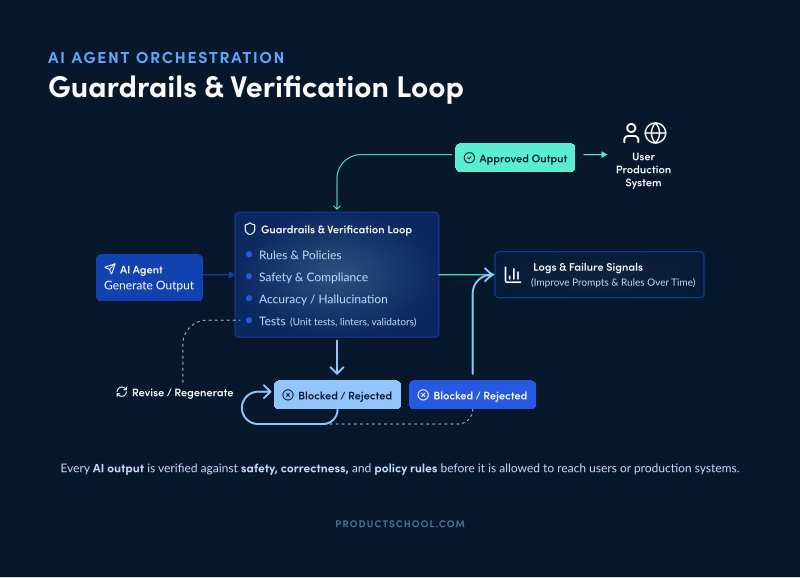
For example, a coding agent might generate code, then a verifier agent runs tests or static analysis on that code. Google’s VeriGuard framework exemplifies this: it “interactively verifies policies and the actions” of an agent, checking each proposed step against safety/security specifications. By verifying each action, “the agent’s behavior remains within safe operational bounds”.
Performance: Verification adds extra work after each step, so it can slow overall progress. However, catching errors early avoids wasted work down the line. The trade-off is usually worth it for high-stakes tasks.
Safety: This is the primary benefit: safety and reliability skyrocket. The verification loop is not optional. It’s the firewall between ‘AI suggested something’ and ‘AI changed production.’” Each output is checked (e.g., for compliance, accuracy, and hallucination) so that only vetted results reach users.
Latency: Each verification step adds latency, since it often requires another model call or rule check. In chatbots, this might add a brief pause after each response. In code generation, running tests or compilers takes extra seconds. Plan accordingly, perhaps by verifying in parallel or only at key milestones.
Cost: Every verification uses compute (e.g., extra API calls or compute for tests). This raises cost, but many organizations accept it to prevent expensive errors. For example, enterprise code tools use automated CI-style checks on AI-generated code.
Robustness: Over time, logs from verification failures can guide improvements in the agent’s prompts or the verification rules themselves. The system becomes self-improving: common mistakes can be filtered out automatically next time.
Guardrails/verification loops are essential for sensitive domains. In customer service, a compliance filter may scan agent replies to ensure no private data leaks. In legal or healthcare workflows, a verification agent might cross-check facts against trusted sources. In coding assistants, every generated function can be run against unit tests and security linters before inclusion.
Teams adopting AI often implement “zero drift” engineering. They block outputs that fail automated verification gates to prevent subtle errors at scale. In essence, verification loops build trust by keeping a human “in the loop” through automation.
5. Agent handoff protocols
Handoff protocols manage when and how one agent transfers a conversation or task to another. In the handoff pattern, an agent passes control entirely to a specialist agent. In the handoff, an agent can delegate the conversation or task to another specialist agent, transferring control and context in a one-way handoff.
Imagine a triage bot that, recognizing a complex billing issue, hands the chat off to a billing-expert agent.
After the handoff, the new agent fully “owns” the conversation. This is like each agent taking a baton in a relay race: one agent passes the conversation state to the next, and the next agent continues with full context.
Performance: Handoff allows each agent to focus. Since each AI agent only handles its domain, performance (accuracy, expertise) typically improves. But the process is sequential. If you hand off through a multi-agent system, one agent after another, the total turnaround time may increase.
Safety: Specialists can enforce strict checks within their domain. If the first agent hands off to an expert, that expert has the right knowledge to verify results. However, if a wrong handoff path is chosen, the user might go down an irrelevant path. Designing robust routing logic (or allowing fallback handoffs) is key.
Latency: Each handoff adds a context switch and an extra agent’s response time. In multi-turn conversations, the user might see multiple “thinking” pauses. This can feel slower than a single-agent reply. Handoffs make sense when depth of expertise trumps speed.
Cost: Using many specialized agents (each possibly a separate model) can be expensive. On the plus side, each agent can be tuned small or cheap for its niche. For some use cases, a small expert agent costs less than a huge generalist. Budget accordingly.
Scalability: Handoff excels in modular systems. New specialist agents can be added (e.g. a new “return policy” agent in a retail bot) without reworking existing agents. The challenge is maintaining shared state across handoffs so context isn’t lost.
Agent handoffs are common in complex chatbots and help desks.
For example, a virtual assistant might escalate from a general FAQ agent to a technical support agent, and finally to a human agent if needed. Google’s Agent SDKs explicitly support handoff; Botpress and LangChain mention “handoffs” in their tooling.
In multi-agent design, one can choose the agents-as-tools (manager model) or the handoff style. You can use handoff when the workflow is structured (clear phases) and each phase needs a specialist.
In practice, an initial agent might break down a project, then transfer each part to a specialized code-generating agent. In customer support, one agent might hand off billing questions to a billing bot and then resume if needed.
Throughout the entire conversation state is carried forward, so the user doesn’t have to repeat themselves.
How to Choose the Right Orchestration Pattern for Your Product
There’s no “best” orchestration pattern. There’s only “best for your product, your risk profile, and your users’ patience.” Here’s how to pick without overengineering.
1. Match the pattern to task complexity
If the task is simple and repeatable, keep orchestration simple. A lot of product teams reach for multi-agent designs when the real need is just good tool use and a clean flow.
If the task is messy, multi-step, and requires decisions along the way, that’s when planner–executor loops or hierarchical decomposition start paying for themselves.
A good gut check: if a human would naturally break the work into phases, your system probably should too.
2. Decide how much speed you can afford to lose
Users say they want “accurate,” but they behave like they want “fast and good enough,” especially in chat-based product experiences.
If latency matters, reduce loops and handoffs. Use tool-routing so the system takes the fastest path for common cases.
If the outcome really matters, accept the extra seconds and add verification. Nobody complains about a slower answer if it prevents a wrong one that costs them money.
3. Design cost before you ship, not after you scale
Orchestration can quietly multiply cost because every extra step often means extra model calls, extra tokens, and extra tool runs.
Tool-routing is usually the quickest win for cost control because it lets you reserve expensive reasoning for the few moments that actually need it.
Planner–executor and hierarchical systems can be worth it, but only when the complexity they remove is bigger than the cost they add.
4. Treat safety as a product requirement, not a feature
If the AI agent you built can take actions, not just talk, you need guardrails and verification loops. Period.
In higher-stakes domains, assume you will need a human-in-the-loop step somewhere, even if it’s only for edge cases or first-time actions.
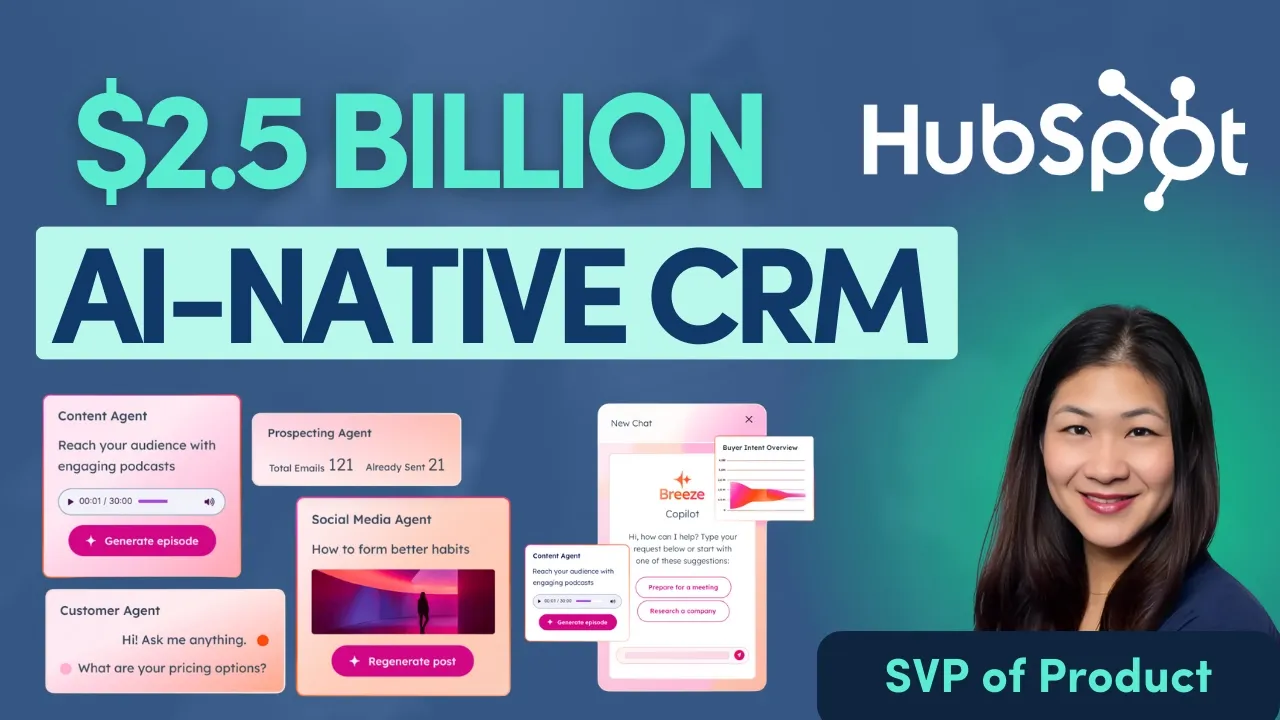
This is also where Karen Ng, SVP of Product at HubSpot, frames the goal really well on The Product Podcast:
Customer agents can resolve something like 40 to 50 percent of issues, which frees the team to spend more time with customers and build better products. Humans still stay in the loop, but now they’re basically supercharged by agents.
5. Instrument the system like it’s a product, not a demo
The first version of orchestration you ship will be wrong. Not because you’re bad at this, but because real users will find edge cases your design never saw.
Track where the agent slows down, where it fails, where it escalates, and where it triggers guardrails. Those traces tell you exactly what pattern you need more of, and what pattern is creating unnecessary overhead.
If you see repeated failures in one subtask, that’s often your signal to introduce a specialist agent or a handoff. If you see repeated hallucinations, you probably need a tighter verification loop or better routing to retrieval.
6. Keep the architecture modular so you can change it later
You want orchestration patterns you can swap, not rebuild.
Start with the minimum pattern set that solves today’s problem, then evolve. The AI-native teams that win with agents rarely start with a perfect architecture. They start with something clear, measurable, and easy to change.
That is how you avoid building a “multi-agent masterpiece” that nobody trusts, nobody can debug, and finance definitely doesn’t want to pay for.
Designing a Hybrid Orchestration Architecture That Actually Scales
In the end, many real systems use hybrid approaches.
For example, a customer service product might use planner–executor for most dialogues, tool-routing for lookup queries, and handoff to humans for tough cases. As HubSpot’s Karen Ng notes, effective AI doesn’t replace humans but “supercharges” them.
The goal is to choose orchestration patterns that augment your team’s strengths and deliver value without unnecessary complexity.
Mastering the Orchestrator Pattern for Reliable AI
Shipping successful AI products requires moving beyond single prompts to sophisticated coordination. We’ve explored how the following orchestrator patterns are critical levers used to balance performance, safety, latency, and cost in production:
Planner-executor loops
Hierarchical task decomposition
Tool-routing
Guardrails/verification loops
Agent handoff protocols
Start with a modular architecture that matches your task's complexity, instrument your system to catch edge cases, and never treat safety as an afterthought. By strategically selecting these patterns, you move from a "demo" to a reliable, scalable system that truly supercharges your users.
Level up on your AI knowledge
Based on insights from top Product Leaders from companies like Google, Grammarly, and Shopify, this guide ensures seamless AI adoption for sustainable growth.
Download Guide
Updated: February 25, 2026